Marketing

How to Monetize Email Newsletters: 6 Strategies That Turn Subscribers into Leads

Ekta Swarnkar - 작성자

Ekta Swarnkar

0 min read

monetize email newsletters


Monetizing a newsletter gets easier when you stop treating the list as a place to drop random offers.


A newsletter is valuable because it gathers people who have already given you permission to show up in their inbox. Some subscribers are casual readers. Some are comparing tools. Some are ready to buy, book a call, register for an event, or request a resource. The job is to match each reader's intent with a clean next step.


That is why newsletter revenue is not only about subscriber count. A small, focused list with clear offers can outperform a large list that sends every reader to the same homepage. Before choosing a monetization model, make sure each offer has a proper capture path: a signup form, resource request page, consultation page, paid checkout, sponsor inquiry page, or referral form.


If you need a simple way to collect subscriber details, qualify interest, and route newsletter clicks into follow-up, create a focused Waveon form and lead capture page for each offer instead of relying on one generic form.


This guide covers six practical ways to monetize email newsletters, when each one works, and how to connect the method to a lead or revenue path without hurting subscriber trust.

6 best ways to monetize your newsletter

The best newsletter monetization method depends on what you already have: a product, a service, expertise, audience trust, sponsor demand, or useful research. You do not need every method at once. Start with the one that fits your audience, then add more only when the newsletter can support it.

1. Sell your products or services

For product and service businesses, this is usually the strongest monetization model. Your newsletter educates the right audience over time, then invites readers to take the next step when the problem becomes urgent.


The basic flow is straightforward:


  • Write educational issues around problems your product or service solves.

  • Use examples, before-and-after stories, and customer questions to make the problem concrete.

  • Add a relevant CTA when the reader needs a deeper resource, template, demo, audit, or consultation.

  • Collect enough context to follow up properly, such as role, company, pain point, timeline, and budget range.


The mistake is pushing the same product pitch in every issue. Readers can feel when a newsletter has turned into a sales flyer. A better approach is to build a repeatable content rhythm: one issue teaches, one issue shares proof, one issue handles objections, and one issue offers a useful next step.


Here is an example of a course creator promoting a special offer to subscribers:
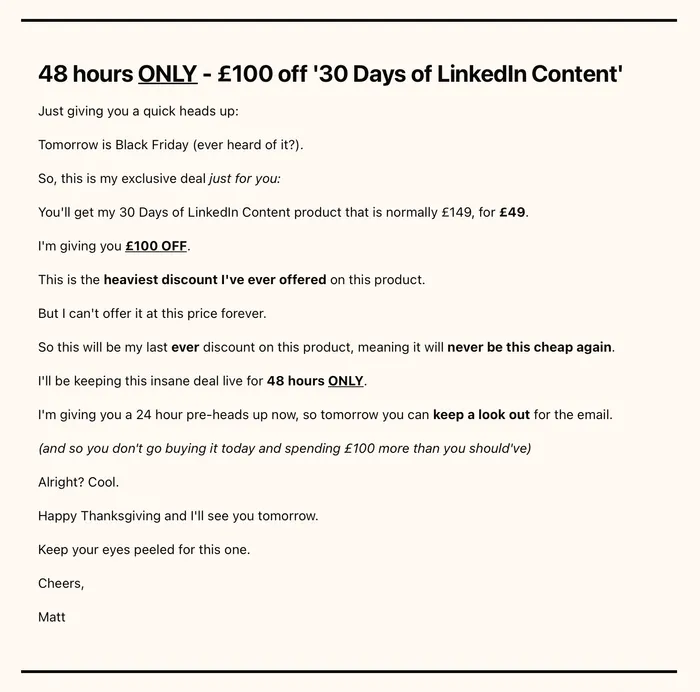

service based newsletter


Outside of seasonal campaigns, newsletters work well as part of a sales funnel. A reader clicks because the topic matters now. Send that click to a specific page that matches the promise, not to a broad homepage where the reader has to figure out what to do next.


For example, a newsletter about reducing manual inbound work can point to a page that offers a workflow checklist and asks a few qualifying questions. A newsletter about a consulting topic can point to a consultation or inquiry page. A newsletter about templates can point to a resource request form. The more specific the page, the easier it is to measure whether the newsletter created real demand.
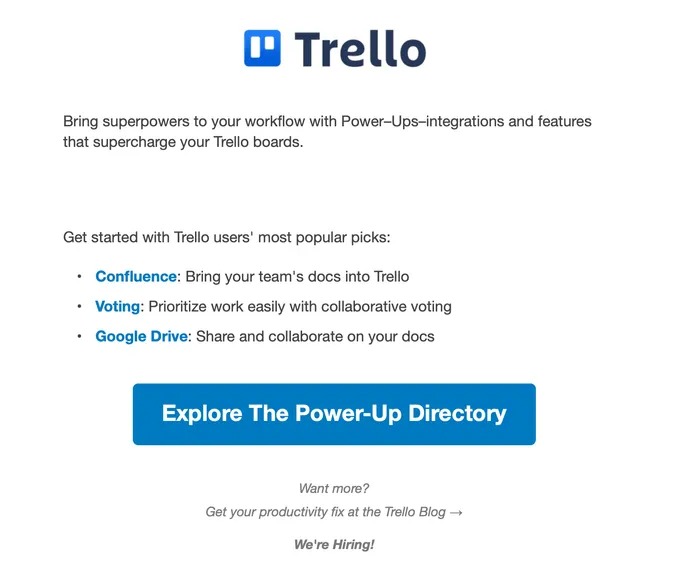

trello product mention

2. Create a paid newsletter

A paid newsletter turns expertise into recurring revenue. It works best when readers believe your analysis, curation, or access saves them time or helps them make better decisions.


For example, subscribers pay to read premium industry analysis from creators such as Michael Spencer's AI Supremacy.


monthly subscription


Paid newsletters are not only for large creators, but they do require trust. If the audience does not already know why your point of view matters, asking for payment too early can slow growth. In that case, keep the main newsletter free and add a premium tier later.


A practical structure is:


  • Free tier: useful public insights, summaries, and lighter analysis.

  • Premium tier: deeper research, templates, private Q&A, database access, deal flow, or tactical teardown content.

  • Lead tier: a request form for teams that want a workshop, audit, or custom implementation.


This lets you monetize without forcing every subscriber into a checkout. Some readers will pay for content. Others will become business leads later.


Ben Goodey's SEO newsletter is an example of a free and paid content mix:
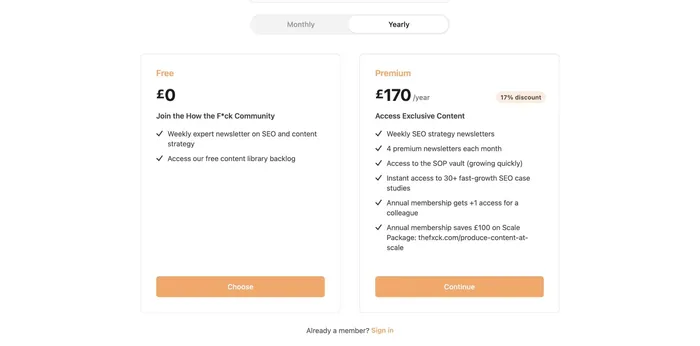

Ben Goodey newsletter subscription


If you already have a newsletter, do not suddenly lock everything behind a paywall. Test a paid add-on first. Track which topics drive clicks, replies, and repeat interest. Those signals tell you what people may pay for.

3. Sell ad space to sponsors

Sponsorship can work well when your newsletter has a clear audience and consistent engagement. Sponsors are not only buying subscriber volume. They are buying access to a specific group of people who trust your curation.


A sponsored placement can be a short block inside a regular issue:
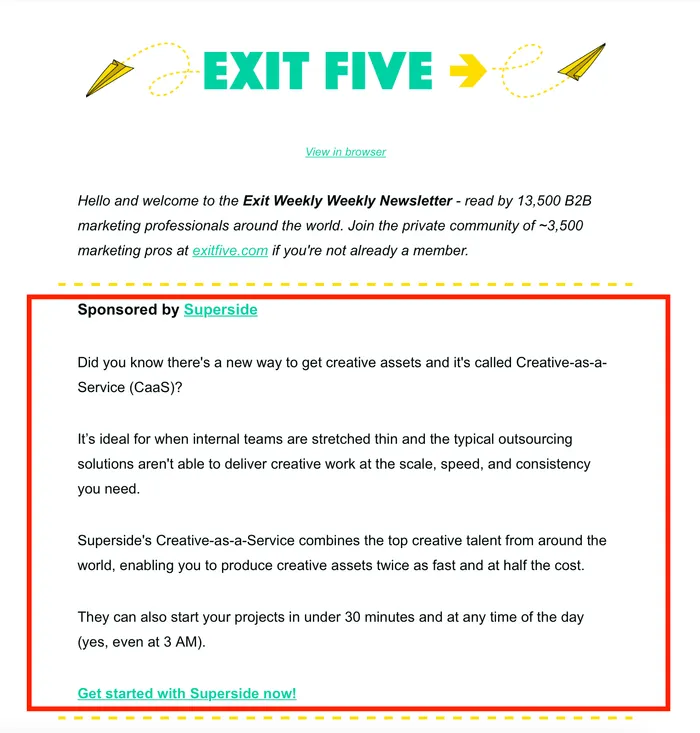

sponsored emails


To make sponsorship attractive, prepare a simple sponsor page or media kit. Include the newsletter topic, audience profile, subscriber count, average open rate, average click rate, past sponsors, available placements, and contact form. This is where many newsletters lose deals: interested sponsors click around and cannot find a clean way to inquire.


If you are ready to sell sponsor slots, send sponsor traffic to a dedicated form. A lead capture page for sponsor inquiries can ask for company name, campaign goal, target market, budget range, desired date, and creative assets. That gives you a stronger starting point than a blank email thread.


If you have not received inbound sponsor requests yet, you can still pitch brands that fit your audience. The fit matters. A random high-paying sponsor can damage reader trust faster than it grows revenue.
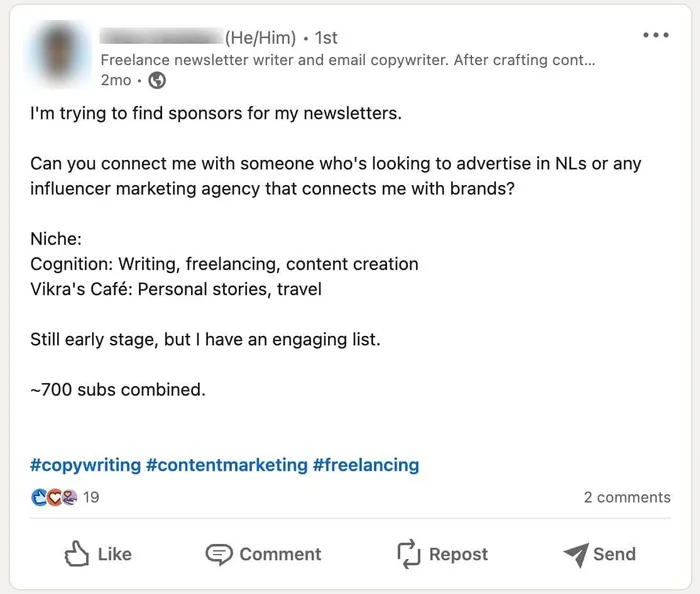

marketing on social media

4. Promote sponsored emails

A sponsored email gives a partner a larger share of attention than a small ad block. Instead of adding a sponsor note inside your issue, the whole issue is built around the partner's story, offer, or educational angle.


This can work when the partner offers something useful to your readers and the message still feels like it belongs in your newsletter. It is risky when it reads like outsourced copy that could appear in any inbox.


Imagine you run a content marketing newsletter and partner with an SEO consultant. The sponsored email could teach readers how to convert search traffic into qualified leads, then invite them to download a checklist or join a workshop. That gives readers value before the partner makes an offer.


Here is an example of a newsletter collaboration between SEO and copywriting audiences:
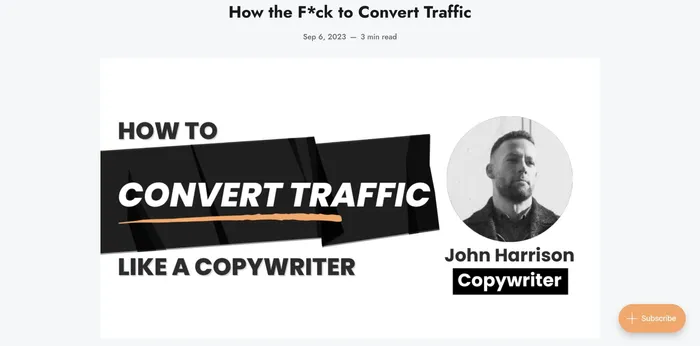

entire sponsored emails


For sponsored emails, protect two things: editorial fit and measurement. Agree on what the sponsor can say, how you will label the sponsorship, where the CTA goes, and what data you can share afterward. If the CTA is a download, event, waitlist, or consultation request, use a dedicated landing form so the sponsor can see real intent instead of only clicks.

5. Promote affiliate products

Affiliate marketing gives you more control than sponsorship because you choose what to recommend and when to recommend it. You earn a commission when subscribers buy through your link.


It works best when the recommendation is genuinely useful. A newsletter about small business operations can recommend tools it has tested. A developer newsletter can recommend hosting, analytics, or productivity products. A marketing newsletter can recommend templates, courses, or software that fit the problem being discussed.


Here is how affiliate promotion can appear inside a newsletter:
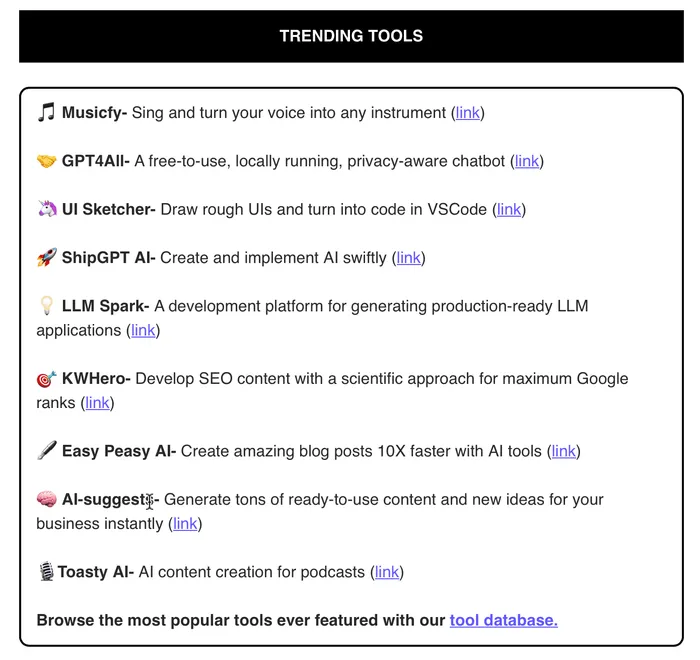

affiliate product promotion


The danger is overuse. If every issue contains an affiliate link, readers will start to question the editorial judgment. Keep a short internal rule: only recommend products that match the issue, disclose the relationship, and explain why the product is useful for that reader.


Affiliate campaigns also benefit from segmentation. A beginner may need a starter tool. An advanced subscriber may need a different comparison, template, or implementation checklist. Use newsletter clicks and form submissions to learn which segment is responding instead of sending the same offer to everyone.
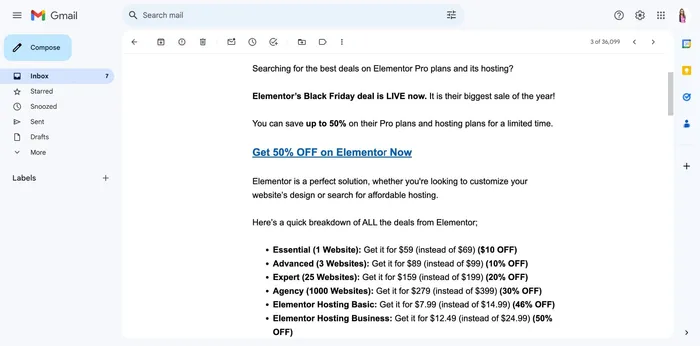

black friday deals

6. Add tip links or supporter options

If you do not have a product, service, sponsor pipeline, or affiliate model yet, tip links can still create a small revenue stream. This is common for research-heavy newsletters, independent creators, job boards, and community newsletters.


Tip links work when readers feel the work is clearly valuable. The value can come from original research, hard-to-find opportunities, thoughtful curation, or a perspective they cannot get elsewhere.


For example, Kaitlyn Arford curates freelance opportunities for subscribers:
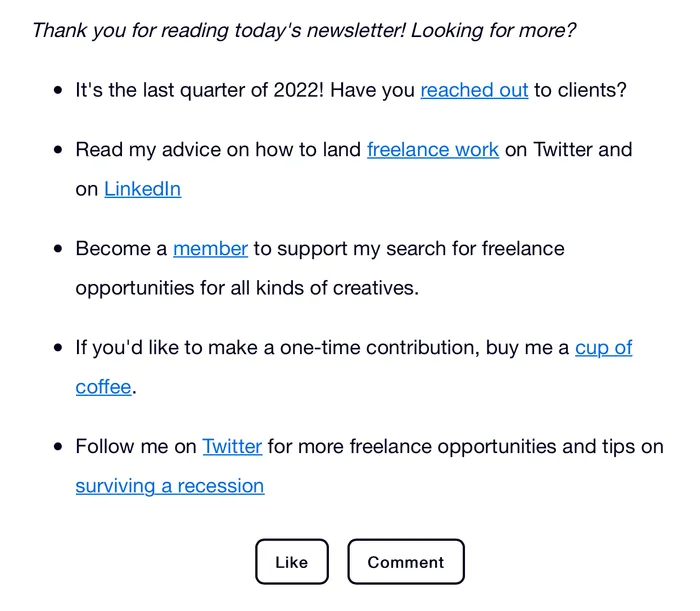

adding buy me coffee link


Place a tip link where it does not interrupt the reading experience, usually near the sign-off or in a recurring support section. Keep the wording simple. You are giving readers an option, not forcing a transaction.
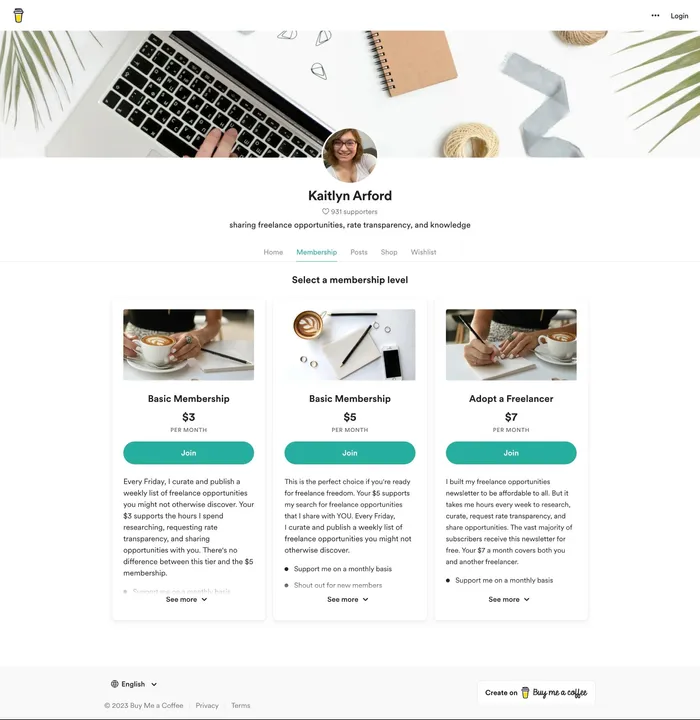

buy me a coffee


Supporter options can also become a bridge to paid memberships. If readers repeatedly support a free newsletter, that may be a signal to test a premium archive, private community, or paid research tier.

Choose the monetization method by subscriber intent

The cleanest way to pick a monetization model is to look at why people subscribe.


  • If they subscribe to solve a business problem, sell a product, service, audit, or consultation.

  • If they subscribe for expert judgment, test paid content or a premium tier.

  • If they subscribe because you gather a hard-to-reach audience, sell sponsorships.

  • If they subscribe for trusted recommendations, test affiliate offers carefully.

  • If they subscribe because they appreciate your independent work, add supporter options.


You can combine several methods, but do it slowly. A healthy newsletter may sell a product one week, publish a sponsor placement another week, and share a free resource the next. That rhythm keeps the newsletter useful instead of making every issue feel like a transaction.

Turn newsletter clicks into measurable leads

The monetization method matters, but the post-click experience matters just as much. A subscriber who clicks from an email has context. They clicked because a specific sentence, offer, sponsor, or example matched something they care about. Do not waste that intent.


Use a dedicated page for each important CTA:


  • A resource request page for guides, checklists, templates, and benchmarks.

  • A consultation page for audits, demos, service inquiries, and sales conversations.

  • A sponsor inquiry page for media kit requests and campaign proposals.

  • A webinar or event registration page when the newsletter promotes a live session.

  • A waitlist page when the offer is not ready to sell yet.


With Waveon forms and lead capture pages, you can create those destinations without building a full website flow for every campaign. Use different fields for different offers, connect the page to your campaign, and review which newsletter issue produced useful submissions.


If you also need the email workflow side, compare newsletter and email platforms in this guide to newsletter automation tools. Then connect the email campaign to a capture page that records what the reader wanted.

Maximize revenue without burning trust

Each monetization method has tradeoffs. Product CTAs can generate high-value leads, but too many pitches will tire readers. Paid tiers can create recurring revenue, but they need a clear reason to pay. Sponsorships can scale, but poor sponsor fit can weaken the newsletter. Affiliate offers can be useful, but only when readers believe the recommendation is honest.


The safest path is to build a simple revenue mix. Keep the newsletter useful first. Add offers that fit the issue. Send each offer to a clear destination. Track clicks, form submissions, replies, and actual sales. Then double down on the method that produces revenue without lowering trust.


Newsletter monetization is not a one-time setup. It is an operating rhythm: publish useful issues, learn what readers want, create better offers, and make the next step easy when someone is ready.

👉 Email Marketing Explained: 5 Strategies for Subscribers, Leads, and Sales

Learn more about No-code insights

Subscribe Waveon Newsletter

*Type your email address
Waveon Banner Image

Other articles

AI & No-Code Website Builder Guide: Platforms, Tools, and Startup Use Cases - Marketing | Waveon
Marketing

AI & No-Code Website Builder Guide: Platforms, Tools, and Startup Use Cases

A practical guide to AI website builders, no-code platforms, and startup website tools. Compare approaches for ecommerce, B2B, and MVP launches.

AI Landing Pages & Website Builders: A Complete Guide - Marketing | Waveon
Marketing

AI Landing Pages & Website Builders: A Complete Guide

Compare AI landing page tools and no-code website builders. Find the right approach for campaigns, brand sites, and startup launches.

Marketing Strategy & Growth Guide: Psychology, SEO, and Product Launch - Marketing | Waveon
Marketing

Marketing Strategy & Growth Guide: Psychology, SEO, and Product Launch

A practical guide to marketing strategy covering consumer psychology, personalization, SEO, product launch, publishing setup, and emerging channels.

Digital Marketing Strategy & Automation: A Complete Guide for SMBs - Marketing | Waveon
Marketing

Digital Marketing Strategy & Automation: A Complete Guide for SMBs

A comprehensive guide to digital marketing strategy and automation for small businesses. Covers marketing automation, content marketing with AI, and growth strategy.

Startup Website Builders: 6 Smart Picks for 2026 - Marketing | Waveon
Marketing

Startup Website Builders: 6 Smart Picks for 2026

Compare startup website builders for lean teams that need fast launches and clear messaging. Find the best fit for your first site.

No-code website for small business lead generation: a practical guide - Marketing | Waveon
Marketing

No-code website for small business lead generation: a practical guide

![Small business owner reviewing no-code website analytics dashboard on laptop for lead generation](https://images.pexels.com/photos/7552374/pexels-photo-7552374.jpeg?auto=compress&cs=tinysrgb&h=650&w=940) If you run a small business, you probably know you “should” have a website—but you might not be sure how to turn that website into actual leads and customers. A no-code website for small business lead generation is a practical way to bridge that gap, even if you have no technical skills and a limited budget. Instead of treating your site like an online brochure, you can treat it like a simple, always-on sales assistant that collects contact details, qualifies prospects, and books conversations for you. ![Entrepreneur viewing responsive no-code lead generation website on laptop and smartphone](https://images.pexels.com/photos/5900034/pexels-photo-5900034.jpeg?auto=compress&cs=tinysrgb&h=650&w=940) In this guide, you will see what makes a no-code lead generation site different from a typical small business website, which tools you actually need, and how to design pages, forms, and popups that convert. We will also look at how to connect everything to your CRM and email tools, and how to track and improve results over time so your site brings in steadily better leads. If you are interested in more focused funnel pages, you may also want to explore how a dedicated landing page builder can support this kind of setup, or how a broader AI website builder fits into your overall marketing stack. ## What a No-Code Lead Generation Website Means for Small Businesses Many small business websites are essentially digital business cards. They list services, share a bit of background, maybe show some photos, and include a generic “Contact us” page. These sites can help people verify that you exist, but they rarely push visitors to take a next step. A no-code website for small business lead generation is built around a different question: “What do I want visitors to do right now, and how do I make that as easy as possible?” On a basic informational website, you usually see a home page with a broad message, a few service pages, an about page, and contact details buried in the footer or a separate contact page. There might be several different links and distractions on every page, from social icons to blog archives. In contrast, a focused lead generation website is organized around clear calls to action, such as “Book a free consultation,” “Request a quote,” or “Get a price estimate in 60 seconds.” Forms are placed prominently, often above the fold on key pages, and repeated in logical places throughout the site so there is always a visible next step. Instead of being passive, the whole experience is designed to guide a visitor from curiosity to commitment. ![No-code landing page design on screen showing clear call to action for small business leads](https://images.pexels.com/photos/16587313/pexels-photo-16587313.jpeg?auto=compress&cs=tinysrgb&h=650&w=940) This lead focus matters because visitors do not spend much time deciding. Various studies show that website visitors form an opinion in milliseconds and often leave within seconds if they do not see value quickly. When you have a sharp message and a clear action button, you give them a reason to stay just long enough to convert. That is why landing pages that focus on a single offer tend to convert better than generic pages. One [HubSpot analysis](https://blog.hubspot.com/marketing/landing-page-stats) found that the average landing page conversion rate across industries is around 5.9%, and many small businesses are far below that simply because their sites are not set up to capture leads. For small businesses, the “no-code” side is just as important as the “lead generation” side. Hiring a developer or agency to build a custom site can easily run into thousands of dollars, and every small change—like tweaking a headline or testing a new form—requires another request and sometimes another bill. A no-code website builder lets you make those changes yourself with drag-and-drop tools, pre-built templates, and simple integrations. This is especially useful when you are moving quickly, testing offers, or working with a small marketing budget. When you can update your own pages and forms in minutes, you are much more likely to keep your website aligned with your current priorities and to experiment with new landing page ideas. There are some situations where hiring a developer or agency still makes sense, like when you need complex custom features or tight integration with in-house systems. But for most small business lead generation needs—service descriptions, lead capture forms, booking widgets, and basic automation—a no-code builder is usually a better fit. It reduces up-front costs, shortens timelines from months to days, and makes ongoing improvements realistic for a small team. If you later decide to expand into more sophisticated experiences, you can often layer additional tools on top of the same foundation, rather than starting over. The specific goals you set for your no-code lead gen site will depend on your type of business. Local service providers, such as plumbers or consultants, usually care about getting people to call, book an appointment, or request a quote. Ecommerce businesses might focus on email signups and first orders. Many B2B businesses want demo requests or discovery calls. A [Growth List round-up](https://growthlist.co/lead-gen-statistics/) noted that roughly a quarter of small businesses do not even know their lead conversion rate, which means they are probably not using their site strategically. When you define simple goals like “10 quote requests per week” or “20 new email subscribers per month,” your no-code website becomes a tool you can actually measure and improve, not just a box you checked years ago. To make these differences more concrete, it helps to compare a typical “brochure” website with a focused no-code lead generation website side by side. | Aspect | Typical Small Business Site (Brochure) | No-Code Lead Generation Site | |------------------------------|-----------------------------------------------------------------------------------|-----------------------------------------------------------------------------------| | Main purpose | Provide basic information and contact details | Capture leads and start sales conversations | | Primary call to action | Generic “Contact us” link, often only on one page | Clear, specific CTAs like “Get a quote” or “Book a free consultation” on key pages | | Lead capture placement | Single contact form buried on a separate page | Short forms or booking widgets placed above the fold and repeated strategically | | Update and testing process | Requires developer or agency for most changes | Business owner or marketer edits pages and tests ideas using no-code tools | | Measurement and improvement | Little or no tracking beyond total visitors | Simple lead goals, tracking of conversion rate, and regular content tweaks | When you look at your own site through this lens, it becomes easier to see where you are closer to the left column and what you might change to move toward the right. If your marketing also relies heavily on paid ads or social media, you can connect this thinking to a dedicated landing page builder approach and create separate campaign-specific pages that plug into the same no-code infrastructure. ## Essential Features of a No-Code Website for Small Business Lead Generation Once you think of your site as a lead engine rather than a brochure, you can see which features really matter. A no-code website for small business lead generation does not need to be complex, but it does need a few essentials working together: clear messaging, trust, easy ways to respond, and simple tools to organize what comes in. On each key page, your first job is to make your value proposition obvious. Visitors should be able to understand in a sentence or two who you help, what you do for them, and why you are a good choice. Headlines like “Stress-free bookkeeping for busy freelancers” or “Same-day AC repair in Austin, guaranteed” tell people immediately whether they are in the right place. Under that, a short subheading can add a concrete benefit or time frame. Many high-converting landing pages studied by [Unbounce](https://unbounce.com/blog/) and others follow this simple pattern of headline plus supporting explanation. Right next to that message, you want a clear call to action and an easy way to respond. That usually means a visible button that leads to a form or booking widget, or even an embedded form above the fold. The form itself should be short and focused. Name, email, and one or two key details (like service needed or preferred time) are often enough to start a conversation. You can ask more questions later by phone or email. When forms are too long or confusing, people simply abandon them and your no-code website for small business lead generation ends up underperforming. ![User filling out simple lead capture form on small business website](https://images.pexels.com/photos/7821577/pexels-photo-7821577.jpeg?auto=compress&cs=tinysrgb&h=650&w=940) Trust signals fill the gap between “This sounds good” and “I am willing to share my details.” For a small business, that can be testimonials with names and photos, star ratings from Google or Yelp, logos of recognizable clients, or mentions of certifications and guarantees. According to various small business website studies, adding social proof like reviews is strongly associated with higher conversions; one 2025 compilation of small business website stats reported that sites using video tend to see noticeably higher engagement and conversion than those without, suggesting that richer proof builds confidence ([source: Marketing LTB](https://marketingltb.com/blog/statistics/small-business-website-statistics/)). You do not need fancy production values—a simple customer quote with a headshot and a short video walkthrough of your process can go a long way. As your traffic grows, more advanced elements like multi-step forms and targeted popups can help you capture leads that would otherwise slip away. Tools similar to Growform or OptinMonster are built around this concept. A multi-step form breaks a longer questionnaire into small, easy steps. The first screen might just ask for a ZIP code and what service someone needs, and the second asks for contact information. Because people have already invested a little effort, they are more likely to complete the form. Many form tools report significantly higher completion rates when using multi-step layouts compared to a single long form, and landing page stats from platforms like Unbounce show that reducing friction at each step can drive meaningful gains in signups. Popups and slide-ins, when used thoughtfully, can also increase the number of leads your no-code website captures. For example, a time-delayed popup might offer a “Free 10-point roof inspection checklist” in exchange for an email address on a roofing site. An exit-intent popup can appear when someone moves their cursor toward the browser’s close button, offering a last-chance discount or a short quote form. While poor popups can be annoying, well-timed ones can convert visitors who were interested but not quite ready to take the main action. Here, borrowing patterns from specialized landing page builder guides can be helpful, since those tools are often built around disciplined popup and form testing. Real-time tools like chatbots add another layer of responsiveness. No-code chatbot platforms such as Chatling, Landbot, or similar tools let you add a chat widget that can answer common questions and collect contact details without you having to sit at your computer. If someone asks for pricing information at 10pm, the bot can reply with a general range and then ask if they would like a personalized quote. When they say yes, it can ask for their email and a few details, then send that lead straight to your inbox or CRM. Tutorials from chatbot providers and conversational design case studies show that these bots can significantly increase engagement on key pages because they meet visitors where they are, in conversational form, rather than asking them to hunt for the right link. The important thing is not to add every possible feature, but to add just enough to make it easy for visitors to say “yes” in whatever way feels most natural to them. Some will prefer a form, some a chat, and some a phone call. A well-designed no-code website for small business lead generation makes all of those paths visible and collects whatever information you need to follow up quickly and professionally. ## Step-by-Step: Building Your No-Code Lead Generation Website If you are starting from scratch—or overhauling a site that is not working—it helps to follow a simple sequence. The process is less about technical skill and more about making clear decisions up front so you do not get stuck tweaking colors for weeks. The first step is choosing a no-code builder that fits your budget and must-have features. Many small businesses do well with all-in-one platforms that combine pages, forms, email, and basic CRM in one place. Others prefer a dedicated landing page tool like [Unbounce](https://unbounce.com/) combined with a separate CRM or email service. When you evaluate options, think practically: Can you create pages using drag-and-drop? Are there templates for service businesses or lead capture? Does it integrate with the CRM or email tool you already use? And does the monthly cost make sense given your traffic and revenue? For a small local business with only a few offers, picking a simpler tool that you will actually use is often better than choosing an enterprise-grade platform you find overwhelming. Once you have a builder, you can plan a basic site structure. For a focused no-code website for small business lead generation, you do not need dozens of pages. A straightforward structure usually includes a home page, one or more dedicated landing pages, and a thank-you page or confirmation page for each form. The home page acts as a hub, giving a clear overview of what you offer and directing visitors to the main calls to action, such as “Get a free quote” or “Book a consultation.” Landing pages focus on specific offers or audiences. For instance, a landscaping company might have separate landing pages for “monthly lawn care packages” and “one-time garden design,” each tailored to that audience. Thank-you pages serve two purposes: they confirm that the form worked, and they give you a chance to suggest a next step, such as downloading a guide, watching a short video, or following you on social channels. A simple real-world example might be a small accounting firm that used to have a generic site listing all services. When they switched to a no-code builder, they created a home page that explained, in plain language, that they help freelancers and small agencies simplify bookkeeping and taxes. Then they added two key landing pages: one for monthly bookkeeping packages and another for annual tax filing. Each page had a simple “Get a custom quote” form and a clear list of what was included. They also set up a thank-you page that explained what would happen next and offered a short checklist to prepare for their call. Within a few months, they were able to see which page generated more inquiries and adjust their pricing and messaging accordingly. After mapping pages, you can set up the core elements that capture and route inquiries. In your builder, create forms for your main actions: quote requests, consultations, and email signups. Configure each form to send submissions somewhere useful: to your email inbox, your CRM, or both. If you use chat widgets or chatbots, add them to key pages like your home page and landing pages and decide what questions they should ask before handing off a conversation. Many no-code platforms also let you set up simple automations, such as sending an automatic confirmation email whenever someone completes a form, or assigning new leads to a specific team member based on what service they selected. ![Business owner connecting no-code website forms to CRM for lead management](https://images.pexels.com/photos/38519/macbook-laptop-ipad-apple-38519.jpeg?auto=compress&cs=tinysrgb&h=650&w=940) Routing inquiries properly is one of the biggest differences between a casual site and a serious lead generation setup. In a casual setup, form submissions might gather in an inbox that nobody checks regularly. In a more deliberate setup, each new lead is tagged, logged, and given a clear owner. The same [lead gen stats](https://growthlist.co/lead-gen-statistics/) that highlight how many small businesses lack visibility into their conversion rates also point out that speed of follow-up has a major impact on closing deals. A basic rule of thumb is that responding within an hour is far better than waiting a day or two; the right no-code automations make that kind of responsiveness feasible, even for small teams. Because this is a guide-style topic, it helps to summarize the build process as a simple checklist you can follow or adapt to your own situation. 1. Define one or two primary goals for your website, such as “get quote requests” or “book consultations.” 2. Choose a no-code website builder that fits your budget, integrates with your tools, and feels easy enough that you will actually use it regularly. 3. Map a lean site structure with a focused home page, one or more offer-specific landing pages, and clear thank-you pages. 4. Create short, purpose-driven forms or booking widgets and place them prominently on relevant pages instead of hiding them on a single contact page. 5. Connect your forms and chat widgets to your CRM or email tool so every new lead is captured, tagged, and sent to the right person. 6. Set up at least one simple automation, such as an instant confirmation email and an internal notification for each new inquiry. 7. Test the full flow from a visitor’s perspective, from first click to thank-you page and follow-up email, fixing any friction you notice. Using this checklist as a rough roadmap keeps you moving forward in a straight line instead of getting lost in details like font choices and button shapes before the basic lead flow is working. Later, if you decide to add more advanced capabilities—like AI-assisted page creation or dynamic content—you can explore how an AI website builder layers on top of the same structure without throwing away what you have already built. ## Designing Pages, Forms, and Popups That Convert Visitors into Leads Once the structure is in place, design decisions determine how many of your visitors actually convert. The good news is that you do not need to guess what works; tools like Unbounce have published years of landing page data and best practices that you can adapt to your no-code website for small business lead generation. Effective landing pages tend to have a few things in common: a focused headline, one primary call to action, minimal distractions, and content that addresses the specific questions and objections of the visitor. If you try to promote every service you offer on a single page, you dilute your message and make it harder for visitors to decide what to do. It is usually better to pick one service or offer per page and write a headline that speaks directly to the outcome your target reader wants. For example, “Book more qualified jobs with done-for-you Google Ads management” is clearer than “Digital marketing solutions.” Below the headline, you can add short sections that explain who this is for, what is included, and what results they can expect. Testimonials and before/after examples help bring these promises to life. Many marketers see higher conversion rates when they simplify navigation on landing pages, removing top menus and extra links that pull people away from the main action. A [HubSpot landing page report](https://blog.hubspot.com/marketing/landing-page-stats) noted that about a third of marketers saw higher landing page conversion rates in 2023 compared to the year before, in part because they focused more on clarity and testing small changes rather than redesigning everything at once. These same habits translate directly to any no-code website for small business lead generation. Form design is a critical piece of this puzzle. People are more likely to start a short, simple form than a long, detailed one. If you need to collect more information to give an accurate quote, consider using multi-step forms. The first step might ask for only one or two easy pieces of information, such as “What service do you need?” and “When do you need it?” Once they click “Next,” you can gently ask for name and contact details, and finally any optional questions that help you qualify the lead. This approach leverages the “foot in the door” effect: once someone has started, they are more inclined to finish. Many form tools and CRO studies report double-digit lifts in completion rates when long forms are broken into logical steps, which is significant when every lead is valuable. Popups and slide-ins can be designed in the same user-friendly way. Instead of interrupting visitors the moment they arrive, set popups to appear after a reasonable delay or on exit intent. You might offer a valuable resource in exchange for an email, like a homeowner’s maintenance checklist, or a small incentive, like a 10% discount on a first service. On product or pricing pages, a slide-in offering “Have questions? Ask us” can encourage people to start a chat or request a callback. Tools similar to OptinMonster have shown through user case studies that targeted campaigns—aimed at specific pages or behaviors—generally perform better than generic, site-wide popups because they feel more relevant and less intrusive. ![Marketer analyzing website conversion rate and lead generation metrics on screen](https://images.pexels.com/photos/12969403/pexels-photo-12969403.jpeg?auto=compress&cs=tinysrgb&h=650&w=940) A practical way to design for conversion is to walk through your own pages as if you were a first-time visitor. Ask yourself: Is it obvious what this business does and who it serves? Do I know what I am supposed to do next? If I am interested but not ready to commit, is there a softer option, like downloading a guide or asking a question? By adjusting headlines, cleaning up layouts, and refining forms and popups based on these questions, you can gradually turn your no-code website for small business lead generation into a consistent source of inquiries. If you want a deeper dive on the page-level details, pairing this with a dedicated guide to landing page builders can help you make even more focused improvements. ## Connecting Your No-Code Site to CRM, Email, and Support Tools A lead is only as valuable as your ability to follow up. That is where integrations come in. A strong no-code website for small business lead generation does more than collect emails; it feeds them into systems that help you track, nurture, and serve those leads over time. Integrating your forms and chatbots with a CRM is one of the most impactful steps you can take. When a visitor fills out a quote form or asks a question in your chat widget, those details can be sent directly to your CRM, where a new contact is created, tagged with the source (for example, “Website – AC repair form”), and assigned to the right person on your team. This means you can see at a glance how many leads are coming from your site, which services they are interested in, and where they are in your pipeline. Over time, you can identify patterns such as which landing pages produce the most closed deals, not just the most form fills. Email marketing connections add another layer of leverage. When someone submits a form, you can automatically add them to a specific email list or segment and trigger one or more automated messages. That might start with a simple confirmation email letting them know you received their request and when to expect a reply. From there, you could send a short sequence of helpful emails that answer common questions, share case studies, and remind them to schedule a call if they have not already. Research from providers like [Mailchimp](https://mailchimp.com/resources/email-marketing-statistics/) and others shows that timely follow-up emails after a signup or inquiry tend to have high open and engagement rates, and they help keep your brand top-of-mind while a prospect is deciding. For businesses that provide ongoing service or support, linking your website to shared inboxes or help desk tools keeps everyone aligned. If a customer submits a support request through a form on your site, that message can create a ticket in your help desk system. If that same person later fills out a form asking about an upgrade, your sales team can see their support history and respond with appropriate context. This shared view of each lead and customer reduces dropped balls and prevents people from having to repeat themselves when they talk to different team members. The technical side of these integrations is usually simpler than it sounds, especially with modern no-code builders. Many platforms have direct connections to popular CRMs and email tools, or you can use an automation service like [Zapier](https://zapier.com/) or [Make](https://www.make.com/) to connect them without writing code. The key is to decide on a basic workflow: which form goes to which list or pipeline stage, who gets notified, and what happens next. Once that logic is in place, your website shifts from being a passive entry point to an active participant in your lead management process. If you are already exploring how an AI website builder fits into your stack, think about these integrations early so you do not have to rewire everything later. ## Tracking, Testing, and Improving Lead Generation Results The last piece of the puzzle is measurement. If you do not track how your no-code website is performing, you will fall into the trap mentioned earlier: running a site without any idea of your conversion rate. That is common—one study cited in the [Growth List lead generation statistics](https://growthlist.co/lead-gen-statistics/) found that about 25% of small businesses are unaware of their lead conversion rates—but it is avoidable with a bit of setup. Start by installing basic analytics, such as [Google Analytics](https://marketingplatform.google.com/about/analytics/), and setting up conversion tracking for your main actions. In many tools, that can be as simple as marking your thank-you pages as conversion goals or adding event tracking to your form submissions. The goal is to answer a few simple questions: How many people visit my site? Which pages do they see? Which pages lead to the most form submissions or bookings? And which traffic sources—such as Google search, social media, or paid ads—produce those conversions? Once you can see this data, you can start running small, focused tests. A/B testing, where you compare two versions of a page or element, is built into many landing page and popup tools like Unbounce and opt-in focused platforms. You might test two different headlines, two different images, or a short vs. longer explanation of your offer. The important thing is to change one major element at a time and give the test enough traffic to reach a useful conclusion. Industry benchmarks like the [Unbounce conversion rate report](https://unbounce.com/average-conversion-rates-landing-pages/) show that while average landing page conversion rates hover in the low-to-mid single digits, the top performers often double or triple that by iterating on copy and structure rather than chasing gimmicks. Beyond quantitative metrics, you should also gather qualitative feedback about lead quality. Sit down regularly with whoever handles sales or service and review a sample of recent leads from your website. Are they the right type of customer? Do they understand what you offer, or are there consistent misconceptions? Are they providing enough detail for you to respond quickly with a useful quote? If many leads are unqualified or confused, that is a sign your on-page messaging or form questions need adjustment. For instance, adding a required budget range field or clarifying which locations you serve can filter out people who would never be a good fit. You can also refine your follow-up workflows based on this feedback. If you notice that leads who receive a same-day response convert at a much higher rate than those who wait two days, you might adjust your automations and staffing to make rapid follow-up the default. If people often ghost after an initial quote, a simple reminder email a few days later, or a short FAQ email addressing common concerns, can bring some of them back. Each of these tweaks is manageable within a no-code ecosystem, especially if you keep your tools minimal and your goals clear. ![Small business team planning no-code lead generation website strategy around a laptop](https://images.pexels.com/photos/7688173/pexels-photo-7688173.jpeg?auto=compress&cs=tinysrgb&h=650&w=940) Over time, this habit of tracking, testing, and refining will compound. Instead of hoping your site works, you will know roughly how much traffic it needs to generate a certain number of leads, and how changes to copy, design, and workflow impact those numbers. At that point, a no-code website for small business lead generation stops being just a project you completed and becomes an asset you manage. When you are ready to go deeper, pairing this approach with resources on landing page builders and AI website builders will give you a broader set of tools to keep improving results. ## Bringing It All Together A no-code website for small business lead generation is not about having the fanciest design or the most tools plugged in. It is about turning your site into a simple engine that consistently nudges visitors toward clear, measurable actions—like requesting a quote, booking a call, or joining your email list—and then making it easy for you to follow up. If you boil this guide down to the essentials, there are a few ideas to keep in mind. First, move away from the “online brochure” mindset and decide what you actually want visitors to do. Second, use a no-code builder so you can manage pages, forms, and small experiments yourself instead of waiting on a developer. Third, keep each key page focused: a clear promise, strong social proof, and one primary call to action, supported by short, low-friction forms or booking tools. Fourth, connect everything to your CRM and email so every inquiry lands in the right place and gets a timely response. Finally, keep an eye on your numbers and be willing to test small changes rather than chasing complete redesigns every few years. You do not have to implement everything at once. A practical way forward is to pick one page and one goal to improve over the next couple of weeks. For most small businesses, that is the home page or a core service page with a single, clear action like “Get a quote.” Rewrite the headline so it spells out who you serve and what result you deliver, tighten the copy below it, simplify your form to the minimum useful fields, and make sure submissions trigger a clear thank-you page and an automatic confirmation email. Once that flow feels solid, you can extend the same pattern to additional landing pages and start experimenting with multi-step forms, popups, and basic A/B tests. If you are already using a landing page or AI website builder, the next step might simply be to connect the dots: make sure those tools are integrated with your CRM, that your analytics is tracking form completions properly, and that someone on your team owns follow-up within a set time frame. From there, improving your lead generation becomes an ongoing habit rather than a one-off project. The tools will keep evolving, but the core approach—clear offers, easy actions, and consistent follow-through—will keep working for your business for a long time.

No-Code Ecommerce Platforms: How to Choose the Right Tool in 2026 - Marketing | Waveon
Marketing

No-Code Ecommerce Platforms: How to Choose the Right Tool in 2026

A 2026 guide to choosing no-code ecommerce platforms, comparing Shopify, Wix, Squarespace, Webflow, integrations, launch planning, and migration steps.

Best Landing Page Generators: 7 Picks for Small Business - Marketing | Waveon
Marketing

Best Landing Page Generators: 7 Picks for Small Business

Compare the best landing page generators for small business growth, lead capture, and speed. Find the tool that fits your budget.

AI Website Builders for Ecommerce: 7 Best in 2026 - Marketing | Waveon
Marketing

AI Website Builders for Ecommerce: 7 Best in 2026

Comparing AI website builders for ecommerce, including Shopify alternatives, pricing, and fit. See which builder suits your store.

Learn more about No-code insights

Subscribe Waveon Newsletter

*Type your email address