
Analytics & Conversion
See where visitors come from
and what actually converts
Connect visitor analytics, UTM links, conversion goals, and ad pixels to understand whether your published pages drive inquiries and signups.
- Traffic
- UTM
- Actions
- CTA
- Conversion
- Goal
Search ads · Channel
Instagram · Campaign
QR campaign · Link
Feature role
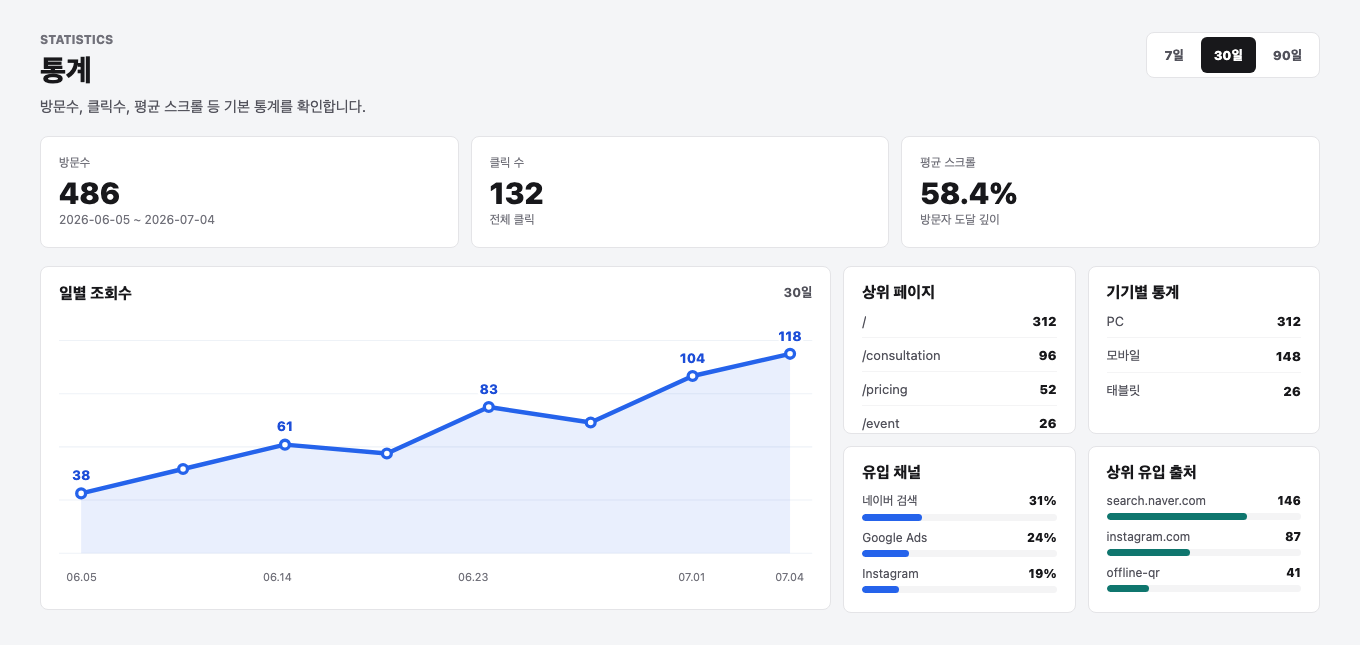
Track visitors, UTM links, and conversions
Product screen
See Analytics & Conversion Tracking inside Waveon
View traffic and conversion by channel.
Core features
Core capabilities
How it works
Workflow
The basic order for putting this feature into operation.
- 01
Publish page
Launch your campaign page.
- 02
Create UTM links
Generate links for each channel.
- 03
Set goals
Choose CTA clicks or completion pages as conversion goals.
- 04
Review results
Check visitors, clicks, and conversions.
Ad landing pagesInquiry campaignsEvent signupsAgency reporting
Use cases
Useful in these situations
01
When you need channel-level performance
Separate visits and conversions from search, Instagram, email, QR, and other channels.
02
When clicks and form submits are conversion goals
Track CTA clicks, completion pages, and form submissions as campaign goals.
03
When you report performance to a team or client
Use data to show whether the page generated real inquiries and signups.
Related features
Features often used together
FAQ
Questions before using this feature
Can I connect GA4 or Meta Pixel?
Yes. Waveon settings support GA and Meta Pixel setup for campaign tracking.
Why use UTM links?
UTM links help you compare performance across search, social, email, QR, and other channels.
Get Started
Review page performance after launch
Use UTM links, visits, clicks, and conversion goals to find campaign-level improvements.
Start for free