
Domain & SEO
Publish with your brand domain
and set up search-ready pages
Use custom domains, SSL, favicons, OG images, search indexing, and Google/Naver ownership verification to improve trust and link sharing quality.
- Domain
- Custom
- SSL
- Auto
- Search
- Verify
Subdomain · Set
Custom domain · Verify
CNAME · Connect
Feature role
Publish with branded domains and SEO settings
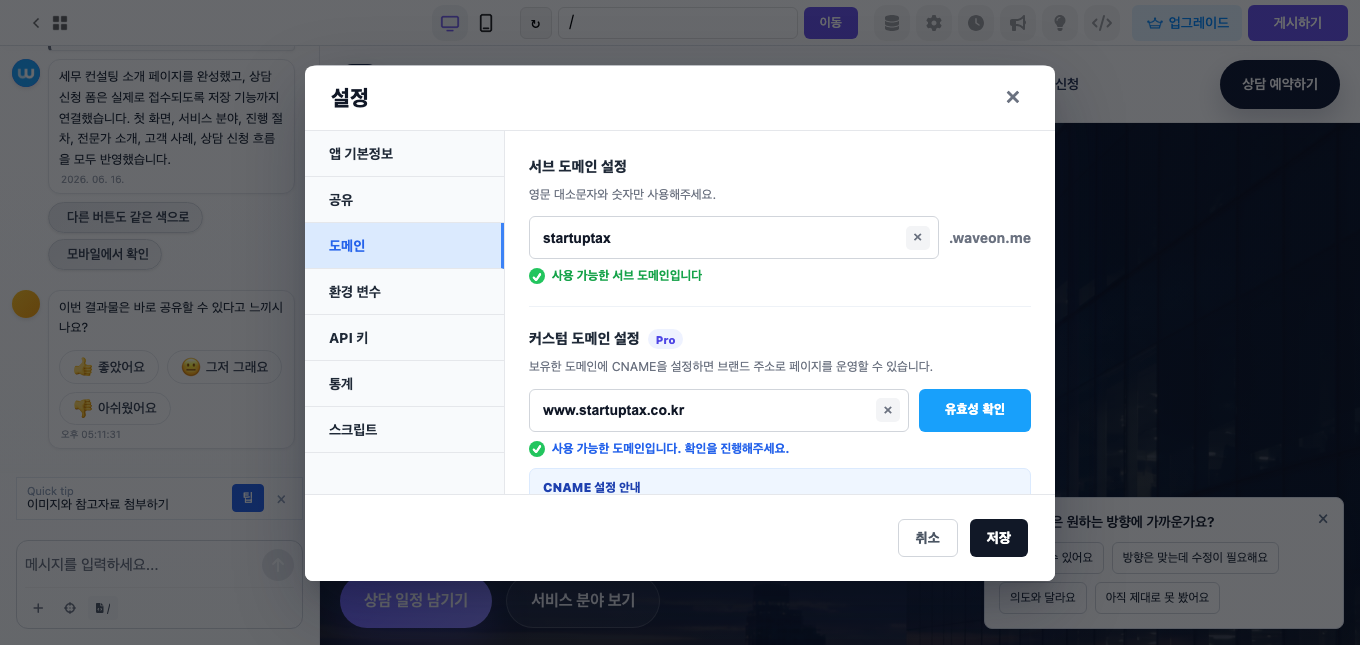
Product screen
See Domain & SEO inside Waveon
Set up subdomains and custom domains so pages can run on a branded URL.
Core features
Core capabilities
How it works
Workflow
The basic order for putting this feature into operation.
- 01
Publish page
Launch with a default URL first.
- 02
Connect domain
Attach your branded domain.
- 03
Set search options
Edit indexing and Google/Naver ownership verification tags.
- 04
Check sharing
Review OG image and link previews.
Brand landing pagesAd campaignsService pagesEvent pages
Use cases
Useful in these situations
01
When ad landing pages need a brand URL
Use a recognizable domain instead of a temporary link to increase trust.
02
When social sharing previews matter
Set OG image, title, and description so shared links look clean.
03
When search visibility needs setup
Manage indexing, ownership verification tags, titles, and descriptions per page.
Related features
Features often used together
FAQ
Questions before using this feature
Can I connect a custom domain?
Yes. Custom domain and SSL features are available depending on your plan.
Can I control search indexing?
Yes. Settings include search indexing and ownership verification options.
Get Started
Set up domain and search details before launch
Prepare your brand URL, sharing preview, and search ownership verification for each page.
Start for free