Insight
Top 7 Benefits of Cloud ERP Systems

Waveon Team
1/31/2025
0 min read
Enterprise resource planning or ERP software solutions help businesses manage and streamline their daily operations, such as accounting, inventory management, and customer service, all in one place. These solutions collect data across departments to help you make informed decisions.
Traditionally, we used to install ERP systems on-premise, which required huge investment in expensive hardware and maintenance staff. These were quite time-consuming and still lacked flexibility and scalability.
To solve these issues, we now have cloud-based ERP systems that come with lower setup costs, higher flexibility and scalability, faster implementation, and other benefits. In this article, we will explore the key benefits of cloud ERP systems to help you decide when to use one for your business.
The key benefits of using cloud-based ERP systems
Though there are many benefits of cloud ERP systems, we’ve listed some of the most important ones to help you make an informed decision.
1. Improved operational efficiency
Cloud ERP systems automate repetitive tasks, streamline workflows, and reduce the need for manual data entry. This makes data more accessible and easier to manage, which saves time, minimizes human errors, and helps improve your overall operational efficiency.
Here are some practical use cases of a cloud-based ERP system:
A hotel business could use a cloud ERP system to automatically generate an invoice, process the payment, and update a guest’s profile with preferences for future visits, during their checkout. This helps refine operations and improve the guest’s experience.
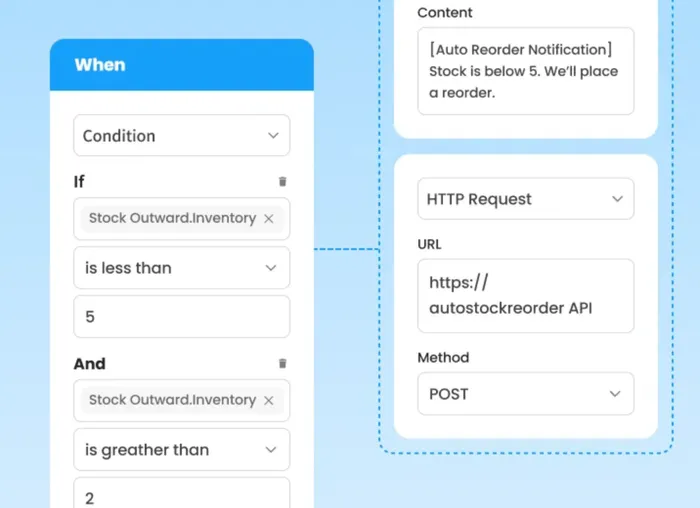
A retail company can automate inventory management by setting up conditions for automatic reordering when stocks reach a certain threshold.
Use a tool like Waveon to set up conditional logic to create automatic workflows that improve your operational efficiency. Here’s an example of conditional logic in Waveon’s inventory management system.
2. Real-time data access
A cloud-based ERP solution collects data from various departments and stores it in a centralized, cloud-based platform. This allows people to access data from anywhere, anytime, which is great for companies with remote employees.
Instead of having data scattered across different departments or on individual devices, everything is stored on the cloud and can be accessed from one place. This allows real-time data sharing and collaboration among teams.
With real-time data access, you can make prompt decisions and respond to situations quickly.
For example, as a retailer, if you want to run a sale or offer, an ERP system can help you:
Immediately see the impact on inventory, sales, and customer orders.
Your warehouse team can adjust stock levels and prioritize shipping in real time for hot-selling products.
All your teams can work together to have smooth operations, deliver better customer service, and optimize inventory management.
A cloud-based ERP solution centralizes data from various departments, improving data accuracy and accessibility. It facilitates real-time data sharing and collaboration among teams and stakeholders.
3. Increased agility and scalability
Cloud ERP systems are easily scalable to accommodate business growth and changing demands. They offer flexibility and adaptability to new technologies and market trends.
You can quickly add new modules or functionalities to your ERP system to keep up with your business’ evolving needs.
For example, as a growing restaurant chain, you can use a cloud ERP system to drag and drop new interface elements and customize the module to:
Track perishable stock.
Monitor supplier deliveries.
Set alerts for low inventory levels.
Similarly, if your restaurant opens more outlets, your cloud ERP system can track inventory, manage payroll, and handle accounting for all locations from one platform.
For wholesale and distribution businesses that need inventory and ordering capabilities without a lengthy ERP rollout, StackCube provides a cloud-based starting point that scales with you.
4. Improved business decision making
Cloud ERP provides valuable insights and analytics, enabling data-driven decision-making. You can use it to identify areas for improvement, optimize resource allocation, and gain a competitive edge.
For example, if you observe a sales drop in a particular location, you can quickly identify the cause and take necessary actions. Maybe it’s an inventory issue that you can solve with automatic reordering workflows.
With consolidated data, it won’t be difficult to identify the issue and resolve it.
ERP systems also let you generate reports on key performance indicators (KPIs) and track the overall progress in achieving your business goals.
5. Better security and compliance
Cloud ERP providers employ robust security measures to protect sensitive data. They maintain highly secure servers to keep your data safe and also regularly apply critical security patches to protect you from newly discovered vulnerabilities.
Cloud ERP system providers also help you comply with industry regulations and data privacy standards. This includes compliance with state, federal, and international provisions such as HIPPA, GDPR, and GAAP.
For example, a hospitality business can store sensitive customer data securely without worrying about breaches. When a guest books a stay, their payment details are tokenized and only authorized staff can access specific data fields. This system significantly reduces the risk of breaches and ensures compliance with data protection regulations.
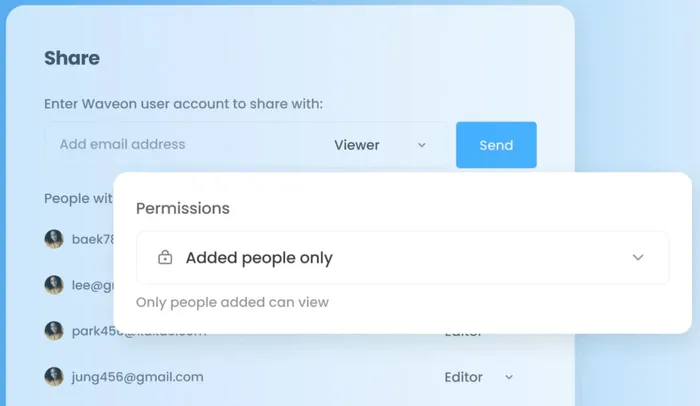
Using an ERP system like Waveon can be helpful here. It lets you decide who can access your data, share access with your team or stakeholders, and set permissions.
6. Lower startup costs
Most cloud-based ERP systems offer lower startup costs since there are no hardware or infrastructure costs.
With traditional systems, you need to buy expensive servers, set them up, and hire IT staff to maintain everything. Whereas, with cloud-based ERP systems, the system provider manages everything. You just need to pay for your monthly or annual subscription.
Most cloud-based ERP systems let you start with a basic, lower-priced plan. You can choose to upgrade to premium plans as your business grows.
7. Faster implementation
Another benefit of cloud ERP systems is that they are easy to set up with minimal hardware and software installation required. The service provider maintains the hardware, infrastructure, and servers, so you don’t have to do much.
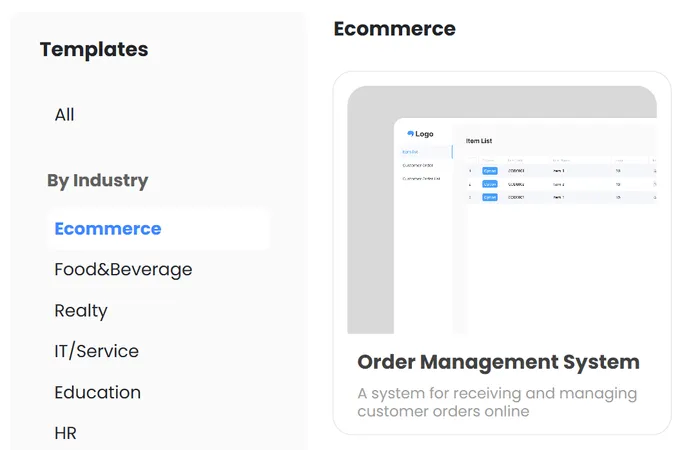
Moreover, cloud-based ERP systems offer industry-specific templates with all essential fields in the interface. You can further add and configure custom fields to meet your business needs.
For example, as an ecommerce business, you can use our no-code order management system to track your customer’s orders.
Waveon: The future of cloud-based enterprise resource planning
Now that you understand the benefits of cloud ERP systems, you should consider using a no-code ERP system like ours. Building a no-code ERP system is a game-changer for businesses with limited technical expertise.
It is easy to set up with a drag-and-drop interface, saving development costs and time.
It offers flexible customization options to help you easily adjust the system for the unique needs of your company and industry.
It also offers simple and fast implementation, allowing you to adopt the system and get it running quickly.
Moreover, it’s budget-friendly and easy to maintain.
So, what are you waiting for? Explore Waveon no-code ERP builder to unlock the potential of cloud ERP for your business growth 一 streamline operations, track inventory, and make data-driven decisions faster than ever!
Learn more about No-code insights
Subscribe Waveon Newsletter
*Type your email address