Marketing
What Is Mailchimp? Email Marketing, Automation, and Lead Capture Basics

Waveon Team
11/7/2023
0 min read
What is Mailchimp? Mailchimp is an email and SMS marketing platform used to design campaigns, manage audiences, build automations, collect contacts, measure performance, and connect marketing data across other tools.
Mailchimp began as an email newsletter tool, but today it is positioned as a broader marketing platform with email, SMS, automation, audience management, forms, analytics, content tools, and integrations. That makes it useful for teams that want one central place to run lifecycle marketing.
The important question is not only "what can Mailchimp do?" It is also "where should each campaign send people after they click?" For many teams, Mailchimp handles the email workflow, while a focused lead capture page qualifies subscribers for downloads, webinars, demos, and consultations.
Core Features of Mailchimp
One of the core features of Mailchimp is its email marketing service. This feature allows users to easily design and run customized email campaigns. It provides various templates and a drag-and-drop editor, enabling the creation of personalized emails without needing advanced technical skills.
Moreover, Mailchimp offers sophisticated audience management capabilities, which allow for segmenting customers based on their behavior, preferences, and previous interactions.
Automation features are also an important part of the service, offering the ability to schedule email sequences that are triggered by certain actions, such as welcome emails for new subscribers or follow-up emails after a purchase. These features, combined with detailed analytics and A/B testing capabilities, help users to improve their engagement and conversion rates significantly.
Mailchimp today: what to know before choosing it
The safest way to understand Mailchimp is to look at its current product areas rather than old user-count or market-share claims. On Mailchimp's own site, the core navigation currently emphasizes email marketing, SMS, marketing automations, AI marketing tools, reporting and analytics, audience management, lead generation, templates, integrations, and support.
That breadth is why Mailchimp is often considered by small businesses, ecommerce teams, creators, nonprofits, and professional-service businesses. It can be a good fit when your main job is to build an audience, send regular campaigns, segment contacts, and automate follow-up messages.
It is less useful to rely on outdated statistics such as old subscriber counts, old revenue figures, or old market-share percentages. Those numbers change, and they rarely tell you whether Mailchimp is the right tool for your actual campaign. A better evaluation is to ask whether it fits your list size, automation needs, ecommerce stack, reporting requirements, compliance process, and post-click conversion path.
If the campaign goal is only newsletter engagement, Mailchimp may be enough. If the campaign goal is a demo request, sponsor inquiry, webinar registration, product waitlist, or sales consultation, connect the email to a dedicated Waveon form and lead capture page so the click becomes a qualified submission instead of just a website visit.
Key Features of Mailchimp
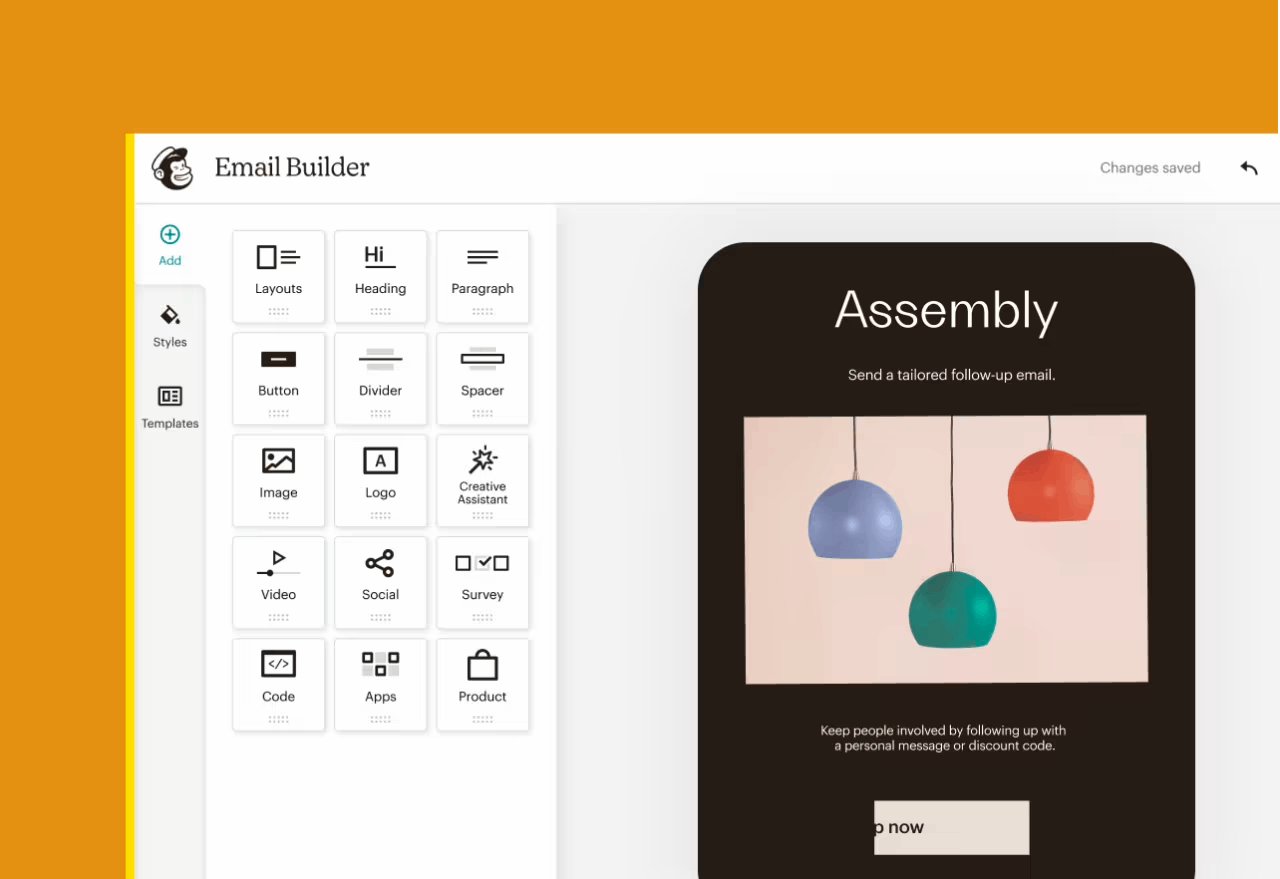
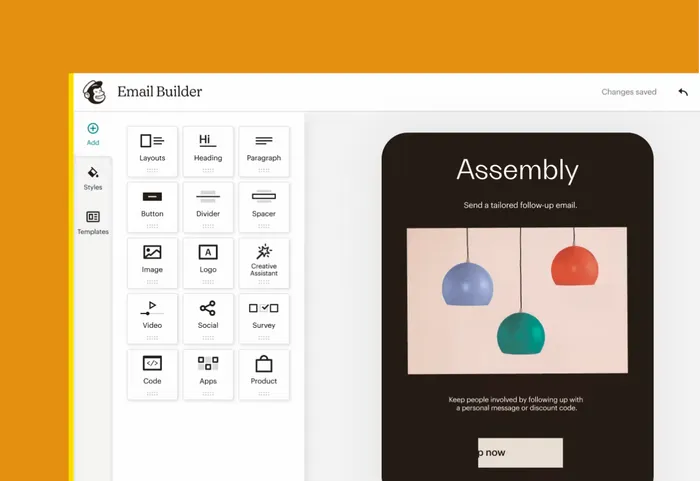
Mailchimp Campaign feature - Email Creation
Mailchimp boasts an easy and convenient email creation feature. With Mailchimp's email builder, even non-professionals can craft professional-looking emails.
Moreover, it provides over 137 different email templates for various purposes, such as announcements, education, event invitations, product sales, service offerings, thank-you emails, and welcome emails, allowing users to create high-quality emails suited to any occasion.
Mailchimp Campaign Feature - Campaign Manager
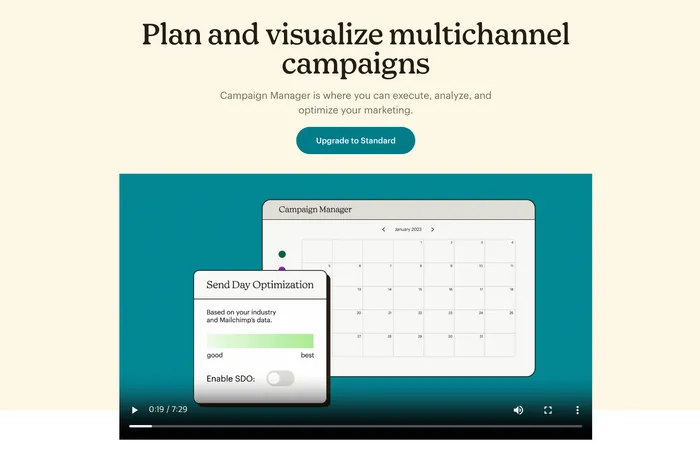
Recently, a new feature called the Campaign Manager has been launched by Mailchimp. The Campaign Manager allows the integration and management of multi-channel campaigns.
Here are some of its key features:
- Multichannel Campaign Calendar: In general, when conducting marketing campaigns, multiple channels are used. This feature provides the ability to manage various channels in an integrated manner.
- SMS: In addition to emails, Mailchimp also allows the sending of text messages.
- Campaign Reports: Managing multiple channels often means that each set of data is stored separately, but with Mailchimp, you can manage data in one place and generate reports.
- Send Day Optimization: Based on data, it predicts the most optimal date to reach out to customers.
Mailchimp Automation Features
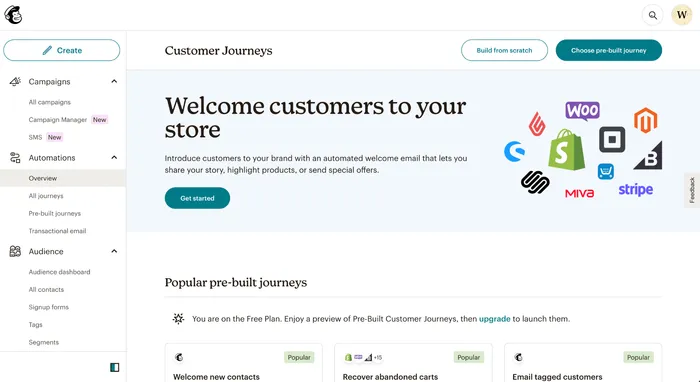
Mailchimp also has the capability to automatically send emails, such as sending a welcome email when a new subscriber signs up or sending a promotion email to users who have items in their shopping cart but haven’t completed the purchase.
Mailchimp Automation Feature - Customer Journey
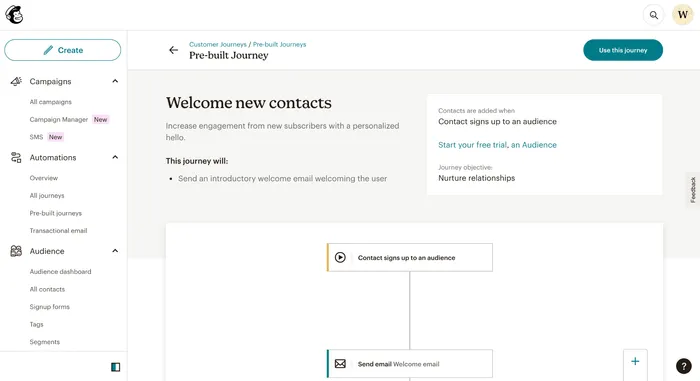
In Mailchimp, automated email sequences are referred to as 'Journeys', and the platform offers a variety of automated email journey templates based on different patterns.
Let’s take a look at some popular examples of the customer journey provided by Mailchimp. They offer a range of automation features, not just limited to email automation.
[New User Exploration & Welcome]
- Send a welcome email when a new subscriber signs up
- Send a welcome email when a popup form is completed
- Automatically register contacts to a Google Sheet using Zapier
- Automatically register contacts to a Google Form upon entry using Zapier
- Automatically send a welcome SMS message to new subscribers
- Receive Slack messages when new subscribers sign up
[Lead Nurturing]
- Re-engage customers who have items in their cart but haven't made a purchase
- Send a birthday celebration email to customers
- Remind customers to reorder
- Automatically send an email to customers who have viewed products on Shopify
[Customer Support & Management]
- Request an online review from customers who have made a purchase
- Ask for feedback from customers who have made a purchase
- Send a thank you email to customers who have responded to a survey
- Send a thank you email to customers who have made repeat purchases
- Receive a Slack notification when a purchase is made by a customer
[Transactional Emails]
- Send order confirmation emails Send shipping confirmation emails
- Send payment confirmation emails
- Send refund confirmation emails
Mailchimp offers a variety of automation templates that can automatically execute a wide range of scenarios to prompt customer actions. Additionally, you can also create and use your own custom automation templates.
Mailchimp Audience Features
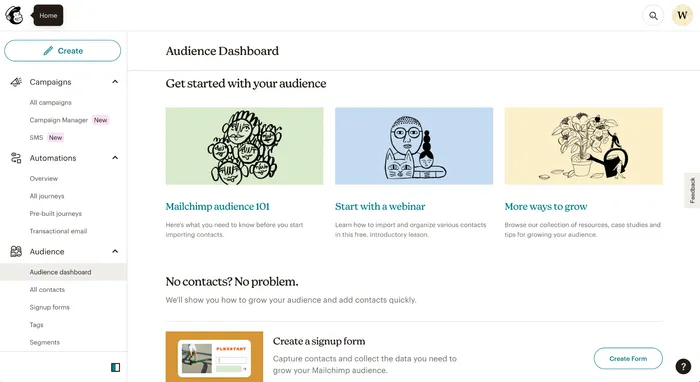
Mailchimp offers a range of features to collect and manage customer information.
Mailchimp Audience Features - Form
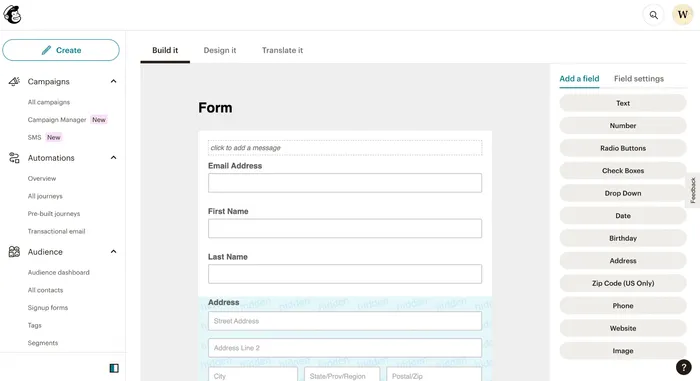
Mailchimp provides a form builder that allows you to easily create various forms. Once a form is created, you can also design it, making it easy to collect customer information. Some types of forms provided by Mailchimp are as follows.
- Form Builder: You can create and customize a standard form and even translate it into various languages.
- Embedded Forms: You can create forms that operate within a website and embed them using the provided HTML code.
- Subscriber Pop-up: You can create pop-up forms that can be placed anywhere on the site.
Mailchimp Audience Features - Segmentation
With Mailchimp, you can divide customers into groups for management. As all customers do not share the same characteristics, it becomes necessary to manage them separately as their numbers grow.
Managing customers in groups is more efficient and can lead to higher conversion rates in marketing. Mailchimp makes it easy to perform this customer grouping.
The segmentation templates provided by Mailchimp are as follows.
- New Subscribers: Customers who have signed up within the last 7 days.
- Engaged Subscribers: Customers who have opened any email from the last five email campaigns.
- Disengaged Subscribers: Customers who have not opened any email from the last five campaigns.
- Potential Customers: Customers who have not placed an order from the store.
- Repeat Customers: Customers who have placed more than two orders.
- Lapsed Customers: Customers who have not placed an order in the last 8 months.
- Recent Customers: Customers who have placed an order in the last 30 days.
- First-time Customers: Customers who have placed their first order within the last 30 days.
Mailchimp provides the functionality to create various customer groups like the ones mentioned above and conduct optimized marketing for each group.
Mailchimp Audience Features - Survey
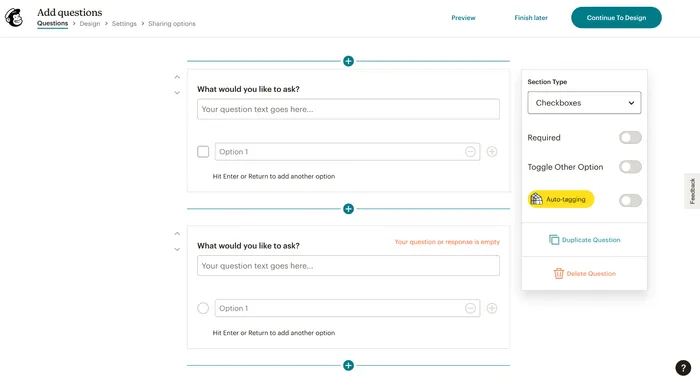
You can create surveys in Mailchimp, which are similar to Google Forms. You can easily produce features commonly included in surveys, such as Radio buttons, Checkboxes, and Ranges.
Mailchimp Data Analysis Features
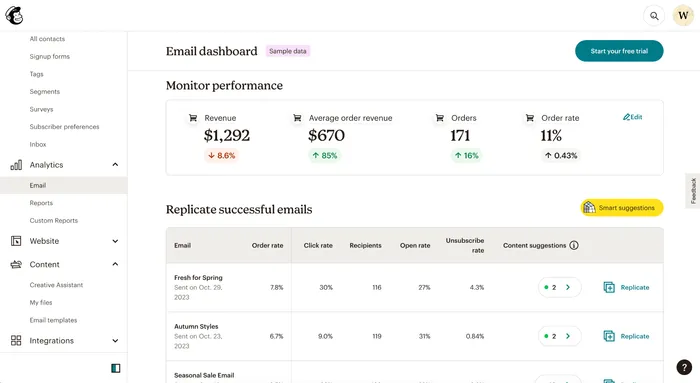
Mailchimp provides a dashboard where you can check detailed analytics for ongoing campaigns. Through the dashboard, you can measure marketing performance and design improvement strategies.
Some of the features offered by data analysis include the following.
- Store Integration: You can integrate stores like Shopify and WooCommerce with Mailchimp to view consolidated data within Mailchimp.
- Conversion Measurement: You can visually measure and manage the entire funnel from email sending, opening, clicking, to purchasing.
- AI-based Smart Suggestions: Mailchimp uses its vast amount of data to provide suggestions for creating optimized content. It also offers predictions on purchase likelihood and customer LTV, and features a campaign improvement suggestion tool called Next Best Action.
Mailchimp Website Features
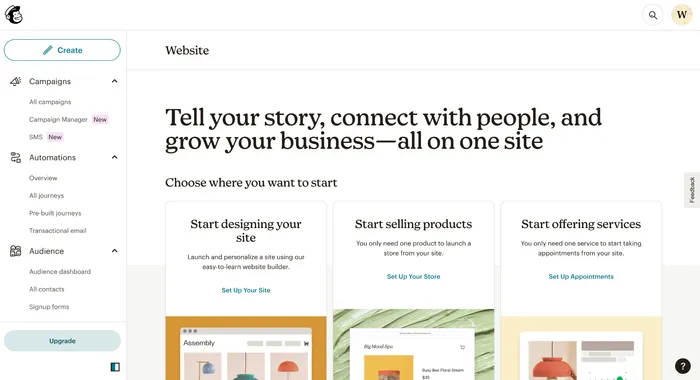
With Mailchimp, you can also create websites, ranging from standard sites to e-commerce sites for product sales, and service provision websites. Plus, they offer expertly designed templates and designs, allowing for easy creation and quick results.
Mailchimp Content Features
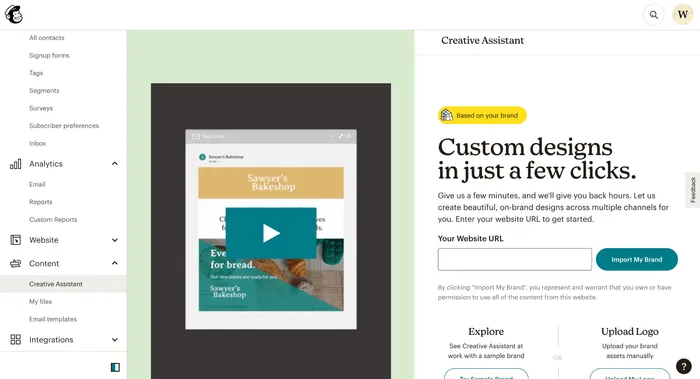
Mailchimp allows you to create various design resources. In my own testing, just by entering the URL of an existing site, Mailchimp can automatically generate several banner designs. Of course, you can also manually modify these after they're created.
Mailchimp Integration Features
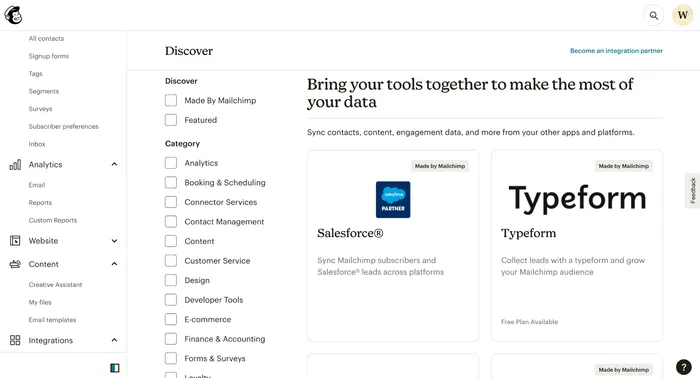
Mailchimp offers various integration features with different services, allowing you to maximize efficiency by integrating with tools you already use.
Here are some frequently used integrations, categorized:
-
Design
- Canva: Easily insert designs created in Canva into newsletters and send them via Mailchimp.
- Vimeo: Similarly, insert and send videos created with Vimeo in newsletters.
-
E-commerce
- Shopify: Run marketing campaigns using contact info, products, and various data provided by Shopify.
- WooCommerce: Integrate customer and order data to perform automated actions.
- Square: Use sales data in conjunction with marketing campaigns.
-
Forms & Surveys
- Typeform: Operate personalized campaigns based on responses from Typeform.
- Jotform: Use forms and electronic contracts to collect user data for lead generation.
-
CRM
- Salesforce: Synchronize Salesforce leads with Mailchimp subscribers to carry out marketing campaigns.
- Monday.com: Manage leads and subscribers in sync to execute marketing campaigns.
Why should you use Mailchimp?
Advantage 1 - All-in-one marketing features provided by Mailchimp
One reason to use Mailchimp is that it is an all-in-one marketing tool that includes a vast array of features necessary for marketing activities. It allows you to operate most of your marketing campaigns using just one tool without the need for multiple tools.
Advantage 2 - Integration capabilities of Mailchimp with other tools
Another advantage is its ability to integrate with many tools, so if you already have tools you're using, you can easily leverage the data from those tools.
What are the limitations of Mailchimp?
Limitation 1 - Inconvenience in sending personal or small batch sales emails
While it is possible to send emails to individuals or a small group of users using Mailchimp, it can be inconvenient compared to a standard email writing tool because there are many additional steps invo
For example, when sending sales emails to a few users, tasks like content replacement and personalization are difficult, and there are many steps involved such as email design and selecting address books. Therefore, for such cases, it may be better to use a standard email tool, like Gmail or Outlook.
Limitation 2 - Limited email customization, design, and code insertion in Mailchimp
Mailchimp does offer customization features, but they have their limitations. If you want to modify the design as you wish or insert code, it can be restrictive, which may be a barrier if you need to run sophisticated email marketing campaigns.
Limitation 3 - Lack of detail in individual features despite providing a variety of functions
Mailchimp offers a really wide range of marketing-related functions. Beyond the core feature of sending emails, it combines several services into one all-in-one tool, including automation, analytics, website builder, and content builder.
While this can be an advantage, it can also be a disadvantage because the details can be lacking compared to tools focused on each separate function. Therefore, if you need a specific function, it might be better to use a dedicated tool that focuses on that particular feature.
Mailchimp Pricing: what to check before you choose a plan
Mailchimp pricing changes over time and can depend on contact count, send volume, plan tier, add-ons, country, SMS use, transactional email needs, and promotional terms. For that reason, this article does not hard-code a price table. Always check Mailchimp's official pricing page before making a budget decision.
Mailchimp's marketing platform plans commonly appear around tiers such as Free, Essentials, Standard, and Premium. The exact limits and included features can vary, so compare the items that actually affect your workflow: contact limits, monthly email sends, user seats, automation features, segmentation, A/B testing, reporting, support, onboarding, and whether SMS or transactional email is required.
For a small newsletter, the key question may be whether the free or entry plan is enough. For a revenue-focused campaign, the bigger question is usually whether the plan supports the automations, segmentation, analytics, and integrations needed to follow up with real leads.
Also separate the email tool budget from the conversion page budget. An email platform sends the campaign, but a landing page or form captures intent after the click. If a campaign asks people to request a consultation, register for a webinar, download a guide, or join a waitlist, create a matching lead capture page and track submissions by campaign.
When to pair Mailchimp with a separate lead capture page
Mailchimp includes forms and audience tools, and that can be enough for a simple subscriber signup. A separate lead capture page becomes useful when the offer needs more context than an email address.
Consultations: collect company, role, problem, budget range, timeline, and preferred contact method.
Webinars: collect topic interest, job role, company size, and pre-event questions.
Resource downloads: collect the resource request, topic preference, and consent for follow-up.
Waitlists: collect use case, launch segment, and urgency.
Partnership or sponsor inquiries: collect campaign goals, target audience, budget, and desired schedule.
In these cases, send the email CTA to the page that matches the promise. If the reader clicked "Book a consultation," use a consultation or inquiry page. If the reader clicked "Get the checklist," use a lightweight download form. This keeps subscriber growth and sales intent from being mixed in one generic signup form.
Mailchimp Alternatives
Mailchimp is a multifunctional tool that includes a variety of features, and depending on the feature, there are a few alternative tools that can be used.
Email Tools
- ActiveCampaign : Includes email marketing, marketing automation, and CRM features.
- ConvertKit : Marketing platform for creators.
- HubSpot : CRM platform
- Klaviyo : Customer data platform with marketing automation features.
- SendGrid : Tool for sending bulk emails.
Website Builders
- Webflow : Website builder knwon for beautiful designs.
- Bubble.io : Website builder that can create complex applications.
- softr.io : Easy website builder.
- WooCommerce : Commerce platform builder.
Automation & Contents creation Tools
- Zapier : Tool for automating repetitive tasks.
- Canva : Tool for creating design resources.
- Drip : Tool for sending automated emails.
Conclusion: What is Mailchimp?
Mailchimp is a broad marketing platform for email, SMS, audience management, automations, forms, analytics, content creation, and integrations. It can be a practical choice when you want one place to manage regular campaigns and subscriber communication.
The main tradeoff is that an all-in-one platform is not always the best tool for every part of the funnel. Mailchimp can send and automate the campaign, but the landing page after the click still needs to match the offer. A generic homepage or newsletter form often loses intent that a focused form could have captured.
Before choosing Mailchimp, check the current official feature and pricing pages, map your subscriber journey, and decide which CTAs need their own capture page. For campaign-specific forms, downloads, webinar registration, waitlists, sponsor inquiries, or sales handoff, use a dedicated Waveon lead capture page alongside the email workflow.
👉 Email Marketing Explained: 5 Strategies for Subscribers, Leads, and Sales
Learn more about No-code insights
Subscribe Waveon Newsletter
*Type your email address