Guides
Inventory Reconciliation Process: Find Mismatches Before They Become Losses

Waveon Team
4/19/2026
0 min read
"The system says we have 200 units. We counted 163."
That 37-unit gap doesn't just mean a number is wrong somewhere. It means your purchasing decisions, sales commitments, and financial reports have all been built on data that doesn't match reality. And if you can't explain where those 37 units went, there's a good chance the same thing is happening across other SKUs right now.
Inventory reconciliation is how you close that gap — not just by adjusting the numbers, but by figuring out why they drifted apart in the first place. This guide walks through the real causes of stock variances, a step-by-step process to find and fix them, and the point at which spreadsheets stop being a viable tool.
What Inventory Reconciliation Means in Daily Operations

That sounds simple. In practice, it's where most SMB operations quietly break down.
The recorded count in your system reflects every transaction that was logged: receiving, picking, shipping, returns, adjustments. The physical count reflects what's actually there. Every time a transaction happens without being recorded — or gets recorded incorrectly — the gap between the two grows.
Unlike a one-time audit, reconciliation is most useful as a recurring process. Teams that reconcile regularly catch variances while they're still small and traceable. Teams that only reconcile at year-end often find variances too large and too old to diagnose.
💡 Reconciliation isn't the same as a physical inventory count. A count tells you what's there. Reconciliation tells you why it's different from what your system says — and what to do about it.
The Most Common Causes of Inventory Stock Variances
Before you can fix a variance, you need to know what caused it. Most stock mismatches in SMB operations trace back to one of four root causes.
Receiving errors. Stock arrives and gets counted quickly, often under pressure. A shipment of 48 units gets recorded as 50. A damaged box gets checked in without flagging the shortage. These small errors at the point of receiving compound over time, especially with high-volume suppliers.
Unrecorded internal movements. Stock moves between storage locations, gets pulled for internal use, or gets set aside as samples — without anyone updating the system. The physical stock moved. The record didn't. This is one of the hardest variances to trace because there's no external transaction to reference.
Returns processed incorrectly. Customer returns that get restocked without a proper return receipt, or supplier returns that leave the warehouse without a corresponding system update, both create phantom variances. The return happened. The record reflects something different.
Unit of measure mismatches. A supplier ships in cases of 12. Your system records in individual units. If the conversion isn't applied consistently at every receiving point, variances accumulate fast — and they're often invisible until a physical count forces the issue.
Root Cause | Typical Variance Pattern | Where It Usually Starts |
|---|---|---|
Receiving errors | Small, consistent shortfalls per SKU | Inbound dock, high-volume receiving |
Unrecorded movements | Variances with no transaction trail | Internal transfers, sample pulls |
Returns processing | Phantom surplus or deficit | Returns desk, supplier return shipments |
Unit of measure mismatch | Large, round-number gaps | Receiving, data entry |
A Simple Inventory Reconciliation Process Step by Step

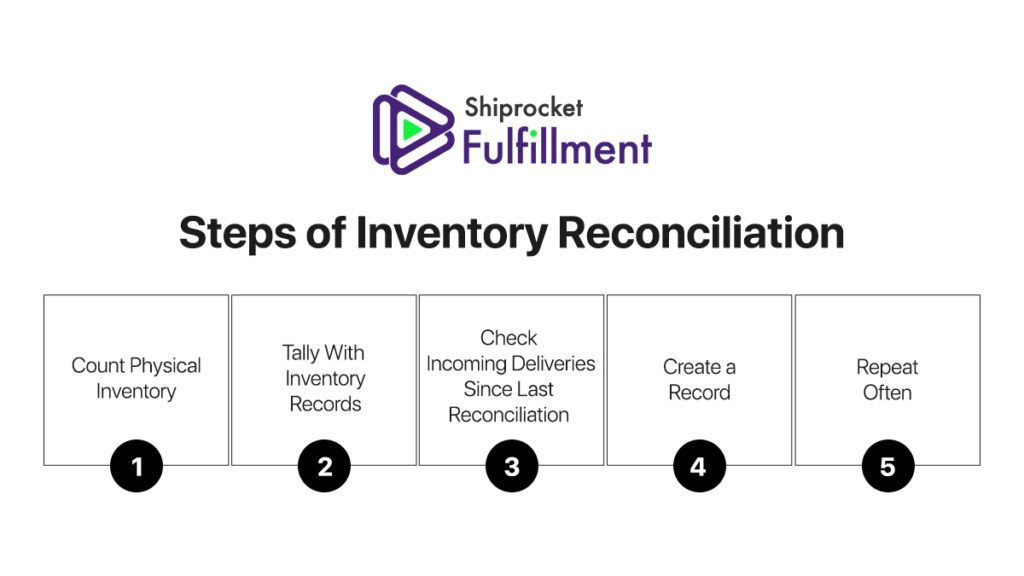
There's no single right way to reconcile inventory, but there is a sequence that makes the process faster and the results more useful.
Step 1. Freeze or flag active transactions.
Before counting, note the last transaction recorded in your system. Any receiving, picking, or returns that happen during the count need to be tracked separately so they can be applied after. You don't need to stop operations — you just need to know where the cutoff is.
Step 2. Count by location, not by SKU.
Counting everything in zone A before moving to zone B is more reliable than trying to track one SKU across multiple locations at once. It reduces the chance of double-counting and makes it easier to assign accountability.
Step 3. Compare counts to system records — before making any adjustments.
Run the comparison first. Flag every variance, regardless of size. Resist the urge to immediately adjust small discrepancies. The pattern across variances often tells you more than any individual number.
Step 4. Investigate before you adjust.
For each variance, ask: is there a receiving record that doesn't match? An unlogged transfer? A return that was handled outside the normal process? Some variances will have clear explanations. Others won't. Document both.
Step 5. Adjust with approval and record the reason.
Update your system to reflect the physical count, but log the reason for every adjustment. "Adjusted to match physical count" isn't a reason — it's a description. "3-unit shortage traced to damaged receiving on [date], supplier notified" is a reason.
Variances with known causes → fix the process that created them
Variances with unknown causes → flag for closer monitoring in the next cycle
Recurring variances in the same SKU → escalate for root cause investigation
💡 For a broader look at inventory management best practices that reduce reconciliation frequency, see Best Practices for Inventory Management.
How Spreadsheets Create Inventory Reconciliation Delays

Spreadsheets are where most SMBs start managing inventory. They work — until the reconciliation process reveals exactly how fragile that setup is.
The core problem isn't that spreadsheets are inaccurate. It's that they're passive. A spreadsheet only reflects what someone chose to type into it. There's no automatic record of who changed what, no alert when a formula breaks, and no connection between the sheet and what's physically happening in the warehouse.
Here's what that looks like during reconciliation:
Version conflicts. Two people update the same sheet on the same day. One version overwrites the other. By the time the discrepancy is found, neither person remembers which entry was correct.
No audit trail. A reconciliation adjustment was made three months ago. Now there's a variance in the same SKU and no way to tell whether it's a new issue or a continuation of the same one. The adjustment history doesn't exist.
Manual comparison at scale. Reconciling 50 SKUs in a spreadsheet is manageable. Reconciling 300 is a half-day project. Reconciling 300 across multiple storage locations is a process that's likely to introduce the very errors it's trying to catch.
The spreadsheet doesn't break dramatically. It slows down gradually — and the cost shows up in reconciliation taking longer, variances being harder to trace, and adjustments being made without proper documentation.
When Inventory Reconciliation Issues Require a Connected System
Not every SMB needs dedicated inventory software from day one. But there are clear signals that the reconciliation process has outgrown its current tools.
The same SKUs show variances in consecutive reconciliation cycles. If the same items keep coming up short or long, the root cause hasn't been fixed — and a spreadsheet isn't helping you find it.
Reconciliation takes more than a day per cycle. If the process of comparing counts, investigating variances, and updating records consistently takes your team more than a day, the manual overhead is creating its own errors.
Adjustments are being made without documented reasons. When reconciliation becomes "fix the number and move on," the process has stopped being useful. You're maintaining the appearance of accurate records, not the reality.
A connected system doesn't eliminate variances — no system does. But it makes them faster to find, easier to trace, and less likely to repeat. Transactions are recorded at the point of occurrence, not retrospectively. Adjustments carry timestamps and user records. Recurring variance patterns surface in reports rather than waiting to be noticed manually.
Waveon gives SMB teams a way to manage inventory movements, log reconciliation results, and track adjustment history — without the setup overhead of a full ERP. If your current reconciliation process relies on a spreadsheet and a lot of manual cross-checking, it's worth seeing what a connected workflow actually looks like. → See how Waveon handles inventory reconciliation
Inventory reconciliation isn't about getting a perfect number at the end of a count. It's about building enough visibility into your stock movements that variances become smaller, less frequent, and easier to explain. The teams that do this well aren't necessarily counting more often — they're recording more accurately in between counts. That's where reconciliation actually happens.
Learn more about No-code insights
Subscribe Waveon Newsletter
*Type your email address